
Print is faint, blurry or barcodes won't scan
Improve darkness and sharpness by fixing the source file first, then adjusting speed and density in the driver.
Test the printer first
Print the sample 4 × 6 label. It is a standard-quality file and should come out crisp. If it does, the problem is your source file or settings, not the printer.
1. Fix the source file
The most common reason for a poor print is a low-resolution or shrunken source:
- A label designed for 8.5 × 11 in paper gets scaled down to fit 4 × 6 — text becomes thin and grey. Get a 4 × 6 label from your platform instead (platform guides).
- Screenshots and photos of labels print badly. Always print the original PDF.
- Make sure the content fills the whole label with no extra border (see Label too small).
2. Check the labels
Darkness depends on the label stock. Cheap thermal labels print grey; good-quality labels print black. HotLabel labels are tuned for these printers — shop labels.
3. Adjust speed and darkness
Slower speed and higher density give a darker, sharper print. Recommended starting point: speed 50.8 or 76 mm/s, darkness 6–8.
Settings → Printers & scanners → your HotLabel printer → Printing preferences (or Control Panel → Devices and Printers → right-click → Printing preferences). Under Settings / Options, set speed and darkness.
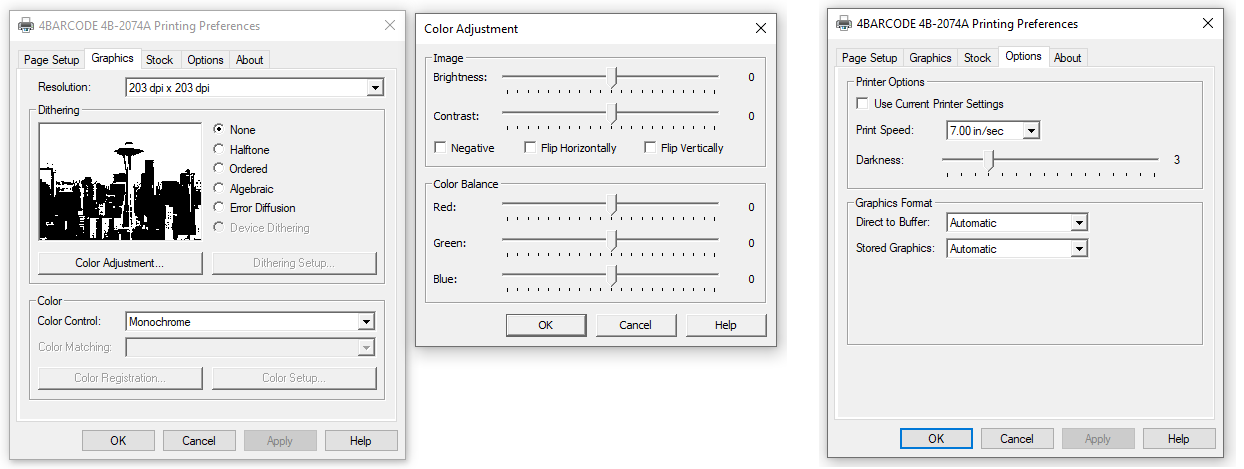
More in Windows printer settings.
In the print dialog, open the Printer Features drop-down and set Print Speed and Darkness. To make it permanent, use the CUPS default options — see Mac printer settings.
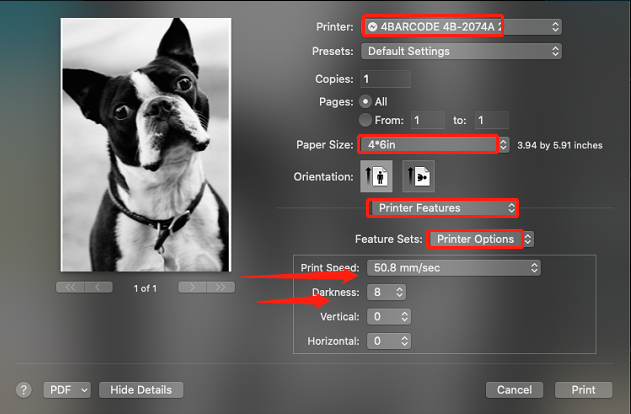
Don't overdo darkness
Too high a density causes dark streaks, or the label heating up and sticking to the print head. Step up one notch at a time.
4. Photos and graphics look blotchy
Set Dithering to Ordered or Halftone in the driver's Graphics tab and print from Paint (Windows) or Preview (Mac). See Print photos and logos.