
Home › Print from a platform
Shopify
Change the label format to 4 × 6 when you buy a Shopify Shipping label.
Set the format
After you buy a label in Shopify, click Change format on the right-hand side of the label page and choose 4 × 6 in. Shopify remembers this for the next label.
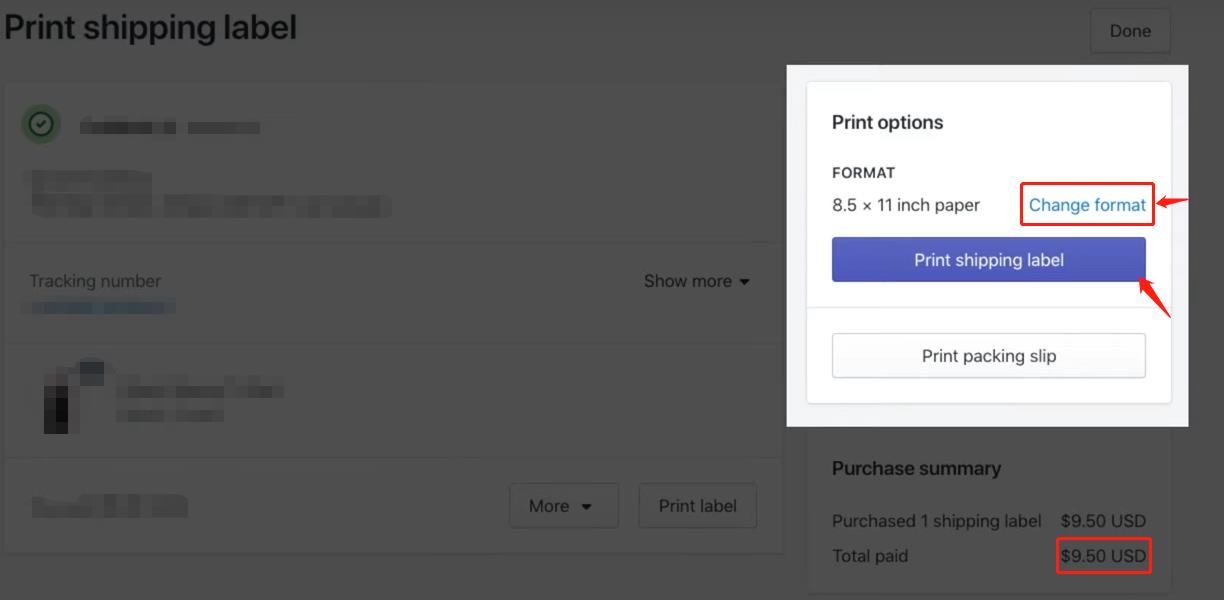
Notes
- Shopify Shipping is available for orders fulfilled from Australia, the United States, Canada and the United Kingdom. Elsewhere, use a shipping app from the Shopify App Store — all major ones offer a 4 × 6 format.
- You can print or void a label from the order page after purchase.
- Official reference: Shopify Help — Shipping labels.
Printing
Print the label PDF with your HotLabel printer selected, paper size 4 × 6 in, scale Fit to page.
Still need help?Live chat 11:30 – 21:00 Mon–Fri (Sydney time) · Email replies within 24 hours · Phone 0478 886 607